What’s the difference? #
Flow Rate/Ratio is about how much filament to extrude per mm in a straight line; It makes surfaces look better in the middle of a layer.
Flow Dynamics1 controls the amount to extrude during direction/speed changes; makes corners, edges and turn backs look better.
Flow Rate #
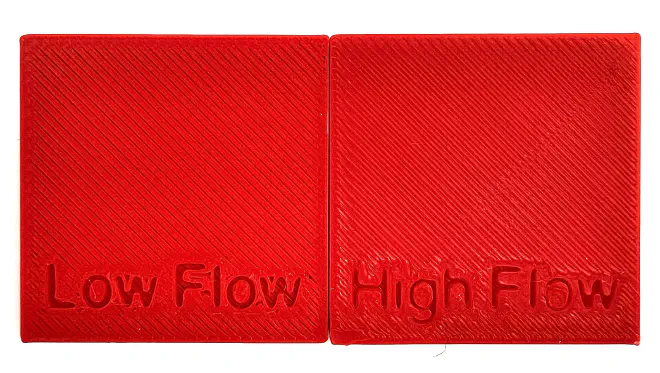
On the “Low Flow” above, you can see that there are gaps between the lines.
On the “High Flow” above, you can see a line from the center to top-right that the lines overlap and create a “scallop” effect.
Calibrating Flow Rate #
Bambu Studio’s Flow Rate Calibration isn’t great; I created a calibration model on Makerworld, complete with guide: YOLO Flow Rate Calibration for Bambu Studio.
There are other good options, but I like mine most.
Flow Dynamics #
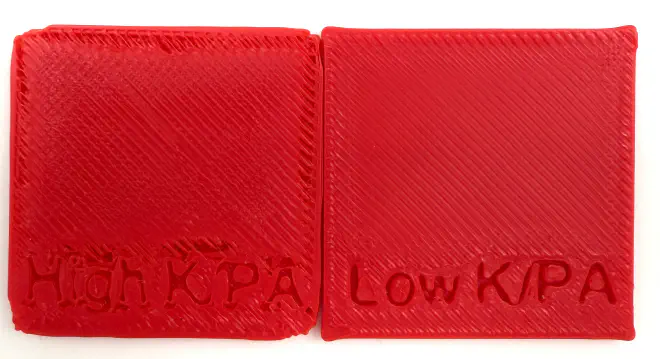
Dynamics / K / PA is about the edges and corners of a print.
On the “High PA” above, you can see that the edges are “torn”, corners are rounded, and areas near a corner, edge, or feature are underextruded.
On the “Low PA” above, you can see that the corners bulge, and there are issues with too much filament extruded in areas near a corner, edge, or feature.
Calibrating Flow Dynamics #
Bambu Studio’s Flow Dynamics Manual Calibration is good; use the built-in “Patterns” option.
Ellis’ Print Tuning Guide has better guidance and examples for interpreting results than the Bambu Wiki.
-
The rest of the world (Orca, Prusa, etc.) calls this Pressure Advance/PA. If you have a non-H2 printer, you’ll see this in Studio in the calibration menu as “Pressure Advance”. ↩︎