Intro #
The P2S doesn’t have a chamber heater, but it does have a way to control the temperature of the chamber.
The P2S does not have an active chamber temperature function, but it can adjust the chamber temperature through a closed chassis and automatic switching between internal and external air circulation.
But you can’t set the chamber temp of your filaments on the P2S in Studio by default.
Here’s two workarounds:
Option 1: Edit the system machine profile #
Open Studio’s config folder. You can get there from Studio via the Help menu -> Show Configuration Folder.
in that folder, you want to edit the file system/BBL/machine/Bambu Lab P2S 0.4 nozzle.json
You’ll see a section of the file that looks like this:
    "printer_model": "Bambu Lab P2S",
    "printer_variant": "0.4",
You want to add "support_chamber_temp_control": "1", to this file. It should look like this:
    "printer_model": "Bambu Lab P2S",
    "printer_variant": "0.4",
    "support_chamber_temp_control": "1",
Save the file and restart Studio. You’ll see that you can edit the chamber temp in your filament profiles now.
Now you can edit the chamber temp in your filament profiles.
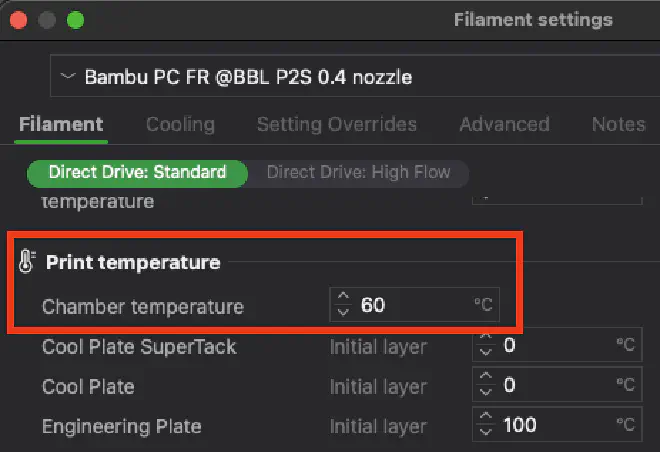
Repeat for the other nozzle sizes as needed.
Option 2: Add a new custom machine profile #
Open Studio’s config folder. You can get there from Studio via the Help menu -> Show Configuration Folder.
Create a new file at user/<youruserid>/machine/Bambu Lab P2S 0.4 nozzle - Chamber Temp.json. Put this in it:
{
    "from": "User",
    "inherits": "Bambu Lab P2S 0.4 nozzle",
    "name": "Bambu Lab P2S 0.4 nozzle - Chamber Temp",
    "printer_extruder_id": [
        "1",
        "1"
    ],
    "printer_extruder_variant": [
        "Direct Drive Standard",
        "Direct Drive High Flow"
    ],
    "printer_settings_id": "Bambu Lab P2S 0.4 nozzle - Chamber Temp",
    "support_chamber_temp_control": "1",
    "version": "2.4.0.8"
}
Now you can select this printer in Studio’s printer selection menu.
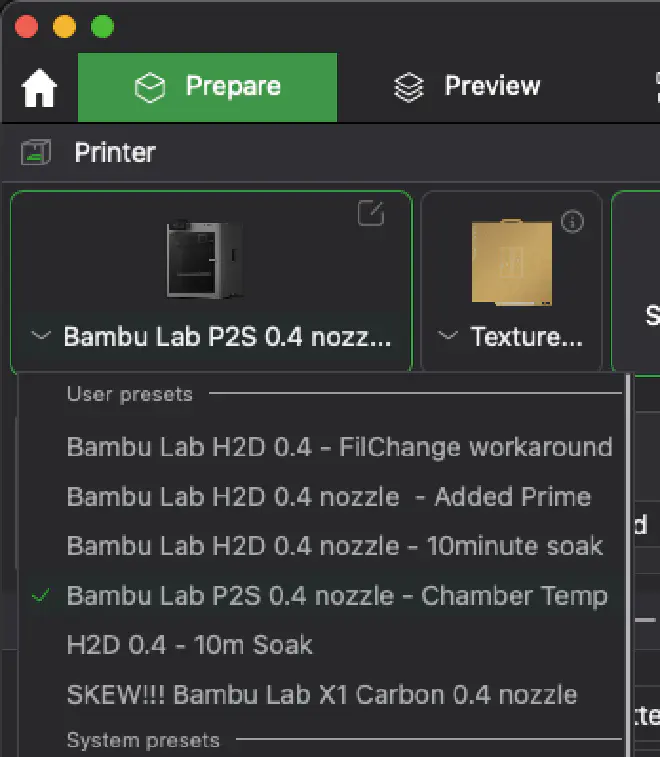
Now you can edit the chamber temp in your filament profiles.
Repeat for the other nozzle sizes as needed.